Initialize NeuroAnalyzer
using DSP
using NeuroAnalyzer
eeg = load("files/eeg.hdf")using DSP
using NeuroAnalyzer
eeg = load("files/eeg.hdf")A filter (\(h\)) is a system that transforms an input signal (\(x\)) into an output signal (\(y\)). Filters are fundamental tools in signal processing, including EEG analysis, where they are used to:
Mathematically:
\[ x \xrightarrow{h} y \]
Definition: A form of signal processing applied to time-series data that attenuates (reduces) signals at specific frequencies while allowing signals at other frequencies to pass unaffected.
Mathematically:
\[ x = x_1 + x_2 + x_3 \]
\[ y = h(x_1) + h(x_2) + h(x_3) \]
This property ensures that filtering is linear and additive, making it predictable and reliable.
Types of Temporal Filters
| Type | Description | Example Use Case |
|---|---|---|
| LP | Allows frequencies below a cutoff to pass; attenuates higher frequencies. | Removing high-frequency noise (e.g., muscle artifacts) in EEG. |
| HP | Allows frequencies above a cutoff to pass; attenuates lower frequencies. | Removing slow drifts or DC offsets in EEG. |
| BP | Allows frequencies within a specific range to pass; attenuates frequencies outside the range. | Isolating alpha (8–12 Hz) or beta (13–30 Hz) bands in EEG. |
| BS | Attenuates frequencies within a specific range; allows frequencies outside the range to pass. | Removing power-line noise (50/60 Hz) in EEG. |
Edge Artifacts
Tapering
Superposition Principle in Detail
The superposition principle states that the filtered output of a sum of signals is equal to the sum of the filtered outputs of the individual signals. This is a fundamental property of linear time-invariant (LTI) systems.
Mathematical Formulation
\[ x(t) = x_1(t) + x_2(t) + \ldots + x_n(t) \]
\[ y(t) = h(x(t)) = h(x_1(t)) + h(x_2(t)) + \ldots + h(x_n(t)) \]
Practical Implications
Adaptive filter changes its properties over time in response to signal.
| Technique | Description | Use Case |
|---|---|---|
| FIR (Finite Impulse Response) | Uses a finite number of samples to compute the output; no feedback. | Real-time filtering, high precision. |
| IIR (Infinite Impulse Response) | Uses feedback to compute the output; can achieve sharp cutoffs with fewer coefficients. | Low-latency filtering, efficiency. |
| Butterworth Filter | Maximally flat frequency response in the passband; no ripple. | EEG, audio processing. |
| Chebyshev Filter | Steeper roll-off than Butterworth but introduces ripple in the passband or stopband. | Applications requiring sharp cutoffs. |
| Elliptic Filter | Steepest roll-off but introduces ripple in both passband and stopband. | High-performance filtering. |
Finite Impulse Response (FIR) filters have a finite duration of impulse response. This means the filter’s output depends only on the current and past inputs (no feedback).
Linear combination of inputs: The output of an FIR filter is a linear combination of the current and past input samples (no feedback or past outputs are used).
Mathematically, the output \(y[n]\) is a weighted sum of the current and past inputs \(x[n], x[n-1], \ldots, x[n-N]\):
\[ y[n] = \sum_{k=0}^N h[k] \cdot x[n-k] \]
where:
\(y[n]\) is the output signal at time \(n\),
\(h[k]\) are the filter coefficients (impulse response),
\(x[n−k]\) is the input signal at time \(n−k\),
\(N\) is the order of the filter (number of coefficients).
Key characteristics
| Feature | Description | |
|---|---|---|
| Impulse response | Finite duration (tails off to zero). | |
| Stability | Always stable (no feedback). | |
| Phase response | Can be designed to have linear phase (no phase distortion). | |
| Computational cost | Higher computational cost due to more coefficients for sharper cutoffs. | |
| Design flexibility | Highly flexible; can achieve arbitrary frequency responses. | a |
Advantages
Disadvantages
Applications
Design Methods
No Feedback: FIR filters do not use feedback (no poles in the transfer function). This makes them always stable. There is no risk of instability or oscillations (unlike IIR filters).
Impulse response:
The impulse response of an FIR filter is the sequence of filter coefficients \(h[k]\). Since the filter output is a weighted sum of a finite number of past inputs, the impulse response settles to zero after \(N\) samples.
Mathematically, if the input is an impulse \(\delta[n]\), the output is:
\[ y[n] = h[n] \quad \text{for} \quad n = 0, 1, \ldots, N-1 \]
and \(y[n] = 0\) for \(n \geq N\).
Finite duration:
The impulse response lasts exactly \(N\) samples (where \(N\) is the filter order). This is why FIR filters are called “finite impulse response”.
Linear phase:
FIR filters can be designed to have linear phase, meaning all frequency components of the signal are delayed by the same amount.
Linear phase ensures that the shape of the signal is preserved (no distortion).
Achieved by designing symmetric coefficient filters.
Symmetric coefficients:
If the FIR filter coefficients are symmetric (i.e., \(h[k] = h[N-1-k]\)), the filter has linear phase. Symmetry simplifies the design and reduces computational complexity.
Example: Symmetric FIR Filter
Advantages of Symmetric FIR Filters
Constant group delay:
The group delay (the delay of the envelope of a signal) is constant for all frequencies in a linear-phase FIR filter.
This is critical for applications like EEG and audio processing, where phase integrity is important.
Power spectrum of the kernel:
The frequency response of an FIR filter is the Fourier transform of its impulse response \(h[k]\).
For a band-pass FIR filter, the frequency response resembles a rectangular or plateau-shaped pass-band (with smooth transitions to the stop-band).
Example: A complex Morlet wavelet kernel is often used for band-pass filtering in EEG analysis.
Higher order (Longer Kernel):
FIR filters typically require a larger number of coefficients (\(N=20 to 2000\)) to achieve sharp cutoffs.
This makes them computationally expensive compared to IIR filters for the same cutoff sharpness.
The convolution operation (applying the filter) involves \(N \times M\), where \(M\) is the length of the input signal.
For real-time applications, optimized implementations (e.g., using FFT-based convolution) are often used.
Example: FIR filter order
| Filter Type | Typical Order (\(N\)) | Applications |
|---|---|---|
| Low-pass | 50–500 | Removing high-frequency noise. |
| High-pass | 50–500 | Removing DC offsets. |
| Band-pass | 100–2000 | Isolating alpha/beta bands in EEG. |
| Band-stop | 50–500 | Removing power-line noise (50/60 Hz). |
Infinite Impulse Response (IIR) filters are a powerful class of digital filters that use feedback to achieve sharp frequency responses with fewer coefficients than FIR filters. However, this feedback introduces stability challenges and non-linear phase behavior.

Feedforward and feedback data flow: The output of an IIR filter is a linear combination of:
Mathematically:
\[ y[n] = \sum_{k=0}^{N} b_k \cdot x[n-k] - \sum_{k=1}^{M} a_k \cdot y[n-k] \]
where:
\(y[n]\) is the output signal at time \(n\),
\(x[n−k]\) is the input signal at time \(n-k\),
\(b_k\) is the feedforward coefficients (zeros),
\(a_k\) si the feedback coefficients (poles),
\(N\) is the order of the feedforward path,
\(M\) is the order of the feedback path.
Feedback loop:
Impulse response:
The impulse response of an IIR filter does not settle to zero after a finite number of samples. Instead, it decays exponentially over time (if stable) or may oscillate indefinitely (if unstable).
Mathematically, if the input is an impulse \(\delta[n]\), the output is:
\[ y[n] = h[n] \quad \text{for} \quad n \geq 0 \]
where \(h[n]\) is the impulse response, which may never fully reach zero.
Persistent output:
Dependence on signal:
Conditions for stability:
All poles (roots of the denominator polynomial) must lie inside the unit circle in the z-plane.
Mathematically, for a transfer function:
\[ H(z) = \frac{B(z)}{A(z)} = \frac{b_0 + b_1 z^{-1} + \ldots + b_N z^{-N}}{1 + a_1 z^{-1} + \ldots + a_M z^{-M}} \]
the poles (roots of \(A(z)\)) must satisfy \(\vert z \vert < 1\).
Unstable IIR filters can produce oscillations, divergence, or noise buildup.
Lower order (Shorter Kernel):
Example: IIR filter order
| Filter Type | Typical Order (\(N\)) | Applications |
|---|---|---|
| Low-pass | 4–10 | Removing high-frequency noise. |
| High-pass | 4–10 | Removing DC offsets. |
| Band-pass | 6–20 | Isolating alpha/beta bands in EEG. |
| Band-stop | 4–10 | Removing power-line noise (50/60 Hz). |
Nonlinear phase and group delay:
IIR filters do not have linear phase by default. This means:
Impact on signal:
Nonlinear phase can distort the shape of the signal, which is problematic for applications like EEG and audio.
Poles and zeros:
For a transfer function:
\[ H(z) = \frac{(z - z_1)(z - z_2)}{(z - p_1)(z - p_2)} \]
where:
\(z_1, z_2\) are the zeros (feedforward),
\(p_1, p_2\) are the poles (feedback).
If \(\vert p_1 \vert > 1\) or \(\vert p_2 \vert >1\), the filter is unstable.
Feedback loops:
Steep frequency response:
Lower side lobes in stopband:
IIR filters typically have lower side lobes in the stopband, meaning they better suppress unwanted frequencies.
Ringing:
Noise buildup
Easier to design:
Faster to compute:
IIR filter design methods
| Method | Description | Applications |
|---|---|---|
| Butterworth | Maximally flat frequency response in the passband. | EEG, audio preprocessing. |
| Chebyshev | Steeper roll-off but introduces ripple in the passband or stopband. | Narrowband filtering. |
| Elliptic | Steepest roll-off but introduces ripple in both passband and stopband. | High-performance filtering. |
t = linspace(-1, 1, 1000)
s = generate_sinc(t; f = 10)
s ./= maximum(s)
w = generate_window(:hann, 1000)NeuroAnalyzer.plot(t, s)
NeuroAnalyzer.plot(t, w)
Filters can be classified as causal or non-causal based on their dependence on past, present, and future input samples. This classification is crucial for real-time signal processing and offline analysis.

A causal filter is a linear and time-invariant system whose output at any time \(t\) depends only on the current and past inputs (not on future inputs).
Mathematically, for a causal filter:
\[ y(t) = \int_{-\infty}^t h(t - \tau) x(\tau) d\tau \]
or in discrete time:
\[ y[n] = \sum_{k=0}^{N} h[k] \cdot x[n-k] \]
where:
\(y(t)\) or \(y[n]\) is the output signal,
\(h(t)\) or \(h[k]\) is the impulse response (causal if \(h(t) = 0\) for \(t < 0\)),
\(x(\tau)\) or \(x[n-k]\) is the input signal.
Key characteristics
| Feature | Description |
|---|---|
| Impulse response | \(h(t) = 0\) for \(t < 0\) (no values before \(t = 0\)). |
| Output dependency | Depends only on past and present inputs (no future inputs). |
| Real-time use | Suitable for real-time systems (e.g., EEG, audio processing). |
| Group delay | Introduces a constant delay (group delay) due to the convolution process. |
A non-causal filter is a filter whose output depends on future inputs (in addition to past and present inputs).
Mathematically, for a non-causal filter:
\[ y(t) = \int_{-\infty}^{\infty} h(t - \tau) x(\tau) d\tau \]
or in discrete time:
\[ y[n] = \sum_{k=-M}^{N} h[k] \cdot x[n-k] \]
where: \(h[k]\) can be non-zero for negative \(k\) (future inputs).
Key Characteristics
| Feature | Description |
|---|---|
| Impulse response | \(h(t) \neq 0\) for \(t < 0\) (includes future inputs). |
| Output dependency | Depends on past, present, and future inputs. |
| Zero delay | Can be designed to have zero group delay (no phase distortion). |
| Real-time use | Not suitable for real-time systems (requires future data). |
Advantages
Disadvantages
Example: non-causal moving average filter
| Feature | Causal Filter | Non-Causal Filter |
|---|---|---|
| Definition | Output depends only on past/present inputs. | Output depends on past/present/future inputs. |
| Impulse Response | \(h(t) = 0\) for \(t < 0\). | \(h(t) \neq 0\) for \(t < 0\). |
| Group Delay | Introduces a constant delay. | Can have zero delay. |
| Real-Time Use | Suitable for real-time systems. | Not suitable for real-time systems. |
| Phase Distortion | May introduce phase shifts. | Preserves phase (no group delay). |
| Examples | Low-pass FIR/IIR filters, Butterworth filters. | Moving average, zero-phase filters. |
| Applications | EEG preprocessing, audio processing, real-time signal enhancement. | Offline signal analysis, post-processing. |
Implications for signal processing
Real-time systems
Offline processing
Zero-phase filtering
Definition: The time delay introduced by the filter, which is the difference between the input and output phase at a specific frequency.

Cause: In a causal filter, the convolution of the input signal with the impulse response only includes part of the signal initially (until the full impulse response is applied).
Group delays is a negative derivative of phase, so constant group delays means the filter is linear phase filter.
Calculation:
For a linear-phase FIR filter, the group delay is:
\[ \tau_g = \frac{N-1}{2} \]
where \(N\) is the filter order (length of the filter window, in samples).
Impact: The output signal is delayed by the group delay, which can be problematic for applications requiring zero delay.
Example: Causal FIR Filter
Group/phase delay: functions that describe the delay times experienced by a signal’s various sinusoidal frequency components as they pass through a filter. These delays are sometimes frequency dependent (different sinusoid frequency components experience different time delays).

Phase delay is in units of time and equals the negative of the phase shift at each frequency divided by the value of that frequency.

Linear phase filter has a flat phase delay property, meaning that all frequencies are delayed in the same way. Non-flat phase delay causes time delay differences among the signal’s various sinusoidal frequency components leading to distortions.
Group delay is a convenient measure of the linearity of the phase with respect to frequency in a modulation system.

The Z-transform is a powerful mathematical tool used in digital signal processing (DSP) to analyze and design discrete-time systems, such as digital filters. It generalizes the Discrete-Time Fourier Transform (DTFT) by incorporating exponential growth or decay into the signal analysis. This makes it particularly useful for studying the stability, frequency response, and design of Infinite Impulse Response (IIR) filters, analogies to the Laplace transform for continuous-time systems.
The Z-transform converts a discrete-time signal \(x[n]\) (where \(n\) is an integer representing the sample index) into a complex frequency domain representation \(X(z)\). It is defined as:
\[ X(z) = \sum_{n=-\infty}^{\infty}x[n] \times z^{-n} \]
where:
\(x[n]\) is the discrete-time input signal,
\(z\) is the complex variable in the Z-domain, often written as \(z = re^{i\omega}\) (polar form), where:
\(r\) is the magnitude (growth/decay factor),
\(\omega\) is the phase angle (frequency in radians/sample).
Purpose
The Discrete-Time Fourier Transform (DTFT) is a special case of the Z-transform where the magnitude of \(z\) is 1 (i.e., \(z = e^{i\omega}\)). It represents the frequency response of a signal:
\[ X(e^{i\omega}) = \sum_{n=-\infty}^{\infty} x[n] \cdot e^{-i\omega n} \]
Interpretation: The DTFT treats the signal as a sum of complex exponentials (sines and cosines) of different frequencies.
Limitation: The DTFT assumes the signal is non-growing (i.e., \(r = 1\)). It cannot represent systems with exponential growth or decay.
Z-Transform The Z-transform generalizes the DTFT by allowing \(z\) to vary in magnitude (\(r\)) and phase (\(\omega\)):
\[ X(z) = \sum_{n=-\infty}^{\infty} x[n] \cdot z^{-n} = \sum_{n=-\infty}^{\infty} x[n] \cdot (re^{i\omega})^{-n} \]
Advantage: By varying \(r\), the Z-transform can represent systems with exponential growth or decay (e.g., IIR filters, unstable systems).
Linear Time-Invariant (LTI) Systems
The Z-transform is particularly useful for analyzing Linear Time-Invariant (LTI) systems, which are the foundation of digital filters.
For an LTI system with impulse response \(h[n]\) and input \(x[n]\), the output \(y[n]\) is the convolution of \(x[n]\) and \(h[n]\):
\[ y[n] = x[n] * h[n] = \sum_{k=-\infty}^{\infty} x[k] \cdot h[n-k] \]
In the Z-domain, convolution becomes multiplication:
\[ Y(z) = X(z) \cdot H(z) \]
where:
\(X(z)\) is the Z-transform of the input signal,
\(H(z)\) is the Z-transform of the system’s impulse response (called the transfer function),
\(Y(z)\) is the Z-transform of the output signal.
Transfer function
The transfer function \(H(z)\) describes how the system transforms input signals into output signals in the Z-domain.
It is typically a rational function (a ratio of polynomials):
\[ H(z) = \frac{B(z)}{A(z)} = \frac{b_0 + b_1 z^{-1} + \cdots + b_N z^{-N}}{1 + a_1 z^{-1} + \cdots + a_M z^{-M}}\]
where:
\(B(z)\) is the numerator polynomial (feedforward coefficients),
\(A(z)\) is the denominator polynomial (feedback coefficients).
Poles: Roots of \(A(z)\) (feedback).
Zeros: Roots of \(B(z)\) (feedforward).
Designing Filters
To design a filter, we define a desired frequency response (e.g., low-pass, band-pass) and find \(H(z)\) that approximates this response.
The inverse Z-transform can then be used to obtain the impulse response \(h[n]\) from \(H(z)\).
Poles
Stability:
Zeros
Definition: Zeros are the roots of the numerator polynomial \(B(z)\) in \(H(z)\). Interpretation: A zero at \(z = q\) means the system attenuates specific frequency components.
Poles and zeros are plotted on the complex plane (Z-plane).
The unit circle (\(\vert z \vert = 1\)) represents the frequency axis for stable systems.
Creating IIR filter:
fs = 100
f = filter_create(fprototype = :butterworth,
                  ftype = :bp,
                  order = 8,
                  cutoff = (10, 20),
                  fs = fs)
Poles:
f.p16-element Vector{ComplexF64}:
0.772730222120692 - 0.5642337926102768im
0.29386652993967477 + 0.8838716409781953im
0.772730222120692 + 0.5642337926102768im
0.29386652993967477 - 0.8838716409781953im
0.695601902379151 - 0.5300448742165345im
0.2993479526642546 + 0.7577390080587313im
0.695601902379151 + 0.5300448742165345im
0.2993479526642546 - 0.7577390080587313im
0.6099410063393964 - 0.5137953559736712im
0.3439507174518397 + 0.6493627863090522im
0.6099410063393964 + 0.5137953559736712im
0.3439507174518397 - 0.6493627863090522im
0.5150237094980352 - 0.5227595531392271im
0.4201703270003071 + 0.5677142673254709im
0.5150237094980352 + 0.5227595531392271im
0.4201703270003071 - 0.5677142673254709imZeros:
f.z16-element Vector{ComplexF64}:
1.0 + 0.0im
1.0 + 0.0im
1.0 + 0.0im
1.0 + 0.0im
1.0 + 0.0im
1.0 + 0.0im
1.0 + 0.0im
1.0 + 0.0im
-1.0 + 0.0im
-1.0 + 0.0im
-1.0 + 0.0im
-1.0 + 0.0im
-1.0 + 0.0im
-1.0 + 0.0im
-1.0 + 0.0im
-1.0 + 0.0imGain:
f.k2.3959644103776224e-5Drawing pole-zero map:
plot_polezero(f.p, f.z)
FIR filters contain as many poles as they have zeros, but all of the poles are located at the origin, \(z=0\). Because all of the poles are located inside the unit circle, the FIR filter is always stable.
This way it gives a correlation to sinusoids (\(e^{-1i \omega n}\)) and exponentials (\(r^{-n}\)) (\(n>1\): growth, \(n<1\): decay). \[ e^{-1i \omega n} \times r^{-n} = (re^{i \omega})^{-n} \]
\[ z = r \times e^{i \omega} \]
and thus \[ X(z) = \sum_{n=-\infty}^{\infty}x[n] \times z^{-n} \]

By knowing the frequency and exponential components of the output system of the response, given a known input, then we know exactly the system the generated that output.
When doing Z transform, we are looking for exponentials and check various values of \(r\) (probing exponential). At some \(r\) value, the probing signal growth at the same rate that the time signal decays. At the value the product is infinite.
Pole: threshold \(r\) value for which the summation reaches infinity. If poles are outside the unit circle, the filter becomes unstable.
Below that value exponential is raising faster than the system is decaying, thus the product is \(> \infty\). The pole is the moment when if jumps from convergence to infinity.
Zero: \(r\) value for which the summation is 0.
If pole is at the value \(r < 1\), then the system is stable (energy of \(x[n]\) exponentially decays over time).
For a finite signal, the summation will never be infinite. Therefore, the Z transform assumes that the signal is infinite. If it is not, we assume what the infinite rest of the data would be.
Z transform can be applied on a model, not on a real signal since it required infinite input. Therefore, there is no fft() equivalent for Z transform. It can be used symbolically: \[
Z(\sin(x)) = \frac{z \sin(1)}{z^2 - 2 \cos(1)z + 1}
\]
Z transform provides a tool for analyzing stability issues of digital IIR filters (it is analogous to the Laplace transform, which is used to design and analyze analog IIR filters).
Filter: \[ y(n) = s(n) \times h(n) \] \(\times\): convolution
\(s(n)\): signal
\(h(n)\): impulse response
\[ Y(z) = S(z) \times H(z) \] \(S\): Z transform of \(s\) \(H\): Z transform of \(h\) \(Y\): Z transform of \(y\)
Designing a filter is all about finding an appropriate h(i), which, under the Z transform, reduces to finding an appropriate H(z). Once H(z) is found, h(i) can be obtained from the inverse Z transform.
For continuous signal the Laplace transform converts it into continuous S domain.
Convert from Z to S domain: \[ z = e^{st} \]
Discrete Z domain is the result of converting a discrete signal using the Z transform:

Pole-zero map is plotted in the Z domain.
Filter filters a signal at a cutoff frequency.
A low pass (LP) filter is used to cut unwanted high-frequency signals, above the cutoff.
A high pass (HP) filter passes high frequencies, cuts below the cutoff.
HP is all pass filter minus LP.
A band pass (BP) filter passes a limited range of frequencies within the cutoff.
A band stop (BS) filter passes frequencies above and below the cutoff range. A very narrow band stop filter is known as a notch filter.

Window design method: required frequency response of a filter response is converted into a filter kernel.
Ideal frequency response:

Next, an impulse response (e.g. sinc) is generated from the ideal filter.

The infinite impulse is multiplied by a window function. Multiplying by window function in the time domain results in the frequency response of the IIR being convolved with the Fourier transform of the window function.

The result of the frequency domain convolution is that the edges of the rectangle are tapered, and ripples appear in the pass-band and stop-band. Working backward, one can specify the slope (or width) of the tapered region (transition band) and the height of the ripples, and thereby derive the frequency-domain parameters of an appropriate window function.

Left: Hamming window, right: rectangular window.
The trick is to select the window type and filter length that will give a filter with the correct rate of roll-off and level of attenuation in the stop band.

To avoid ripple artifacts (at the cutoff frequency) in the time domain the filter should be designed to have a smooth transition in the frequency domain.
Impulse response: filter output when the input signal is the Kronecker delta function (single impulse at time 0 and zeros everywhere else).
Filter -3 dB = attenuation by 30% = 70% of the signal is passed through.
Cutoff: half-amplitude frequency = frequency that is suppressed in 50%, e.g. 25 Hz LP filter: passes 10% of the signal at 50 Hz.
Order: roll off of a digital filter = number of points that are averaged by the filter at any one time; higher order means steeper roll-off.
For FIR filters: filter order (taps) is the number of samples used in calculation; more samples means more accuracy (better frequency response), but is slower.

Pass-band: frequency at which the output is preserved.
Stop-band: frequency at which the output is severely attenuated.
The designed filter is translated into filter kernel, that gives more or less imperfect frequency response:

Frequency response of a filter is the amplitude spectrum of the filter kernel.

Frequency response of a low pass filter:

-60 dB is the filter attenuation.
In NeuroAnalyzer transition band is calculated as:
f_pass = cutoff[1] - (bw / 2), f_stop = cutoff[1] + (bw / 2)f_pass = cutoff[1] + (bw / 2), f_stop = cutoff[1] - (bw / 2)f1_stop = cutoff[1] - (bw / 2), f1_pass = cutoff[1] + (bw / 2), f2_pass = cutoff[2] - (bw / 2), f2_stop = cutoff[2] + (bw / 2)f1_pass = cutoff[1] - (bw / 2), f1_stop = cutoff[1] + (bw / 2), f2_stop = cutoff[2] - (bw / 2), f2_pass = cutoff[2] + (bw / 2)where bw is the transition band width in Hz and cutoff specifies cutoff frequency for LP and HP or frequencies for BP and BS.

Wider plateau means lower frequency precision and higher temporal precision.
Wider transition zone means less pass band ripple = cleaner, better filter kernel.
Narrower transition zone mean steeper filter, but also less stop band attenuation (higher amplitude of ripples in the stop band).

Left: 31 taps, right: 11 taps.
Example: impulse response of FIR LP filter, cut off at 10 Hz, default Hamming window:
flt = filter_create(fprototype = :fir,
                    ftype = :lp,
                    cutoff = 10,
                    bw = 1,
                    fs = 256)
t = linspace(-1, 1, length(flt))
NeuroAnalyzer.plot(t, flt)
And its frequency response:
f, _ = freqs(flt, 256)
_, _, p, _ = ftransform(flt)
plot_psd(f, p, flim = (0, 40))
Detailed frequency response:
plot_filter(fprototype = :fir,
            ftype = :lp,
            cutoff = 10,
            bw = 1,
            fs = 256,
            gui = false)
Same FIR band pass filter, but using Bartlett window:
flt = filter_create(fprototype = :fir,
                    ftype = :lp,
                    cutoff = 10,
                    bw = 1,
                    fs = 256,
                    w = DSP.bartlett(91))
t = linspace(-1, 1, length(flt))
NeuroAnalyzer.plot(t, flt)
And its frequency response:
f, _ = freqs(flt, 256)
_, _, p, _ = ftransform(flt)
plot_psd(f, p; flim = (0, 40))
Other impulse responses:
Low pass FIR filter:
flt = filter_create(fprototype = :fir,
                    ftype = :lp,
                    cutoff = 10,
                    bw = 0.5,
                    fs = 256)
t = linspace(-1, 1, length(flt))
NeuroAnalyzer.plot(t, flt)
High pass FIR filter:
flt = filter_create(fprototype = :fir,
                    ftype = :hp,
                    cutoff = 10,
                    bw = 0.5,
                    fs = 256)
t = linspace(-1, 1, length(flt))
NeuroAnalyzer.plot(t, flt)
Therefore, when designing a filter, check its amplitude spectrum over the ideal design.
When FIR filter is applied on the signal, its frequency response modifies individual frequencies of the input signal:

Bode plot: graphical representation that shows how the gain (magnitude) and phase of a system respond over a range of frequencies.

Applying a filter introduces a phase shift in the data. The amount of the phase shift is determined by the length of the filter kernel. These phase shifts are an artifact and should be corrected.
Phase shift correction:
Phase distortions introduced by filtering are reintroduced in reversed-time, thus reverse-distorting the distortions.
General rule: signal → FFT → signal .* kernel → IFFT

Constraints:
Perform filtering in short windows (1 second) (= block convolution).
Use windowing to remove edge artifacts.
To avoid loss of information due to windowing use overlapping (by 25-75%) epochs.
HP kernel (at 7 Hz): 1 / (1 + exp(-frq + 7)), where frq = linspace(0, fs, n) and n = length(signal)
LP kernel (at 7 hz): 1 - (1 / (1 + exp(-frq + 7)))
BP kernel: plateau-shaped, e.g. rectangular
Order: number of time points of kernel (length(kernel) = order + 1)
For EEG signals, a useful rule of thumb is that order should be 4 to 5 times the number of time points in one cycle of the lowest analyzed frequency. For example, in gamma rhythm (35-45 Hz) one cycle is about 25 ms and the order of the filter would be be 100 ms. If the sampling rate is 500 Hz, then the filter order would be 50 data points.
HP 0.05-1.0 Hz: removes slow artifacts, reduces offset/slow trends (demeaning/detrending)

LP 35.0-70.0 Hz: removes fast artifacts
Notch (BS) 50.0 Hz: removes AC noise

HP filter should always be applied to continuous, non-epoched data. Filtering at 0.5 Hz gives edge artifacts lasting up to 6 seconds.
HP makes analysis of very slow oscillations difficult. Solution: use DC-coupled amplifiers. For very fast (>100 Hz) oscillations MEG is better.
For analyzing a time-domain signal in a specified frequency range: FIR = IIR.
For analyzing phase values of the filtered signal: FIR > IIR.
The following filters (specified using the fprototype parameter) are available:
FIR filters:
:fir):firls):remez)IIR filters:
:butterworth):chebyshev1):chebyshev2):elliptic):iirnotch)All major filter types (specified using the ftype parameter) are available: low pass (:lp), high pass (:hp), band pass (:bp) and band stop (:bs).
Filter cutoff must be specified in Hz (cutoff parameter). For band pass and band stop filters, a pair of frequencies must be provided.
Filter order is specified usign the order parameter: order is the filter steepness for :butterworth, :chebyshev1, :chebyshev2, :elliptic or number of taps for :fir, :firls and :remez filters
Filtering includes two steps:
filter_create())filter_apply())The filter() function combines both steps.
Filtering direction is set using the dir parameter:
:twopass: two passes, the resulting signal has zero phase distortion, the effective filter order is doubled:onepass: single pass:reverse: one pass, reverse directionAlso, smoothing (LP) filters are available:
FFT filtering is performed using the Gaussian filter.
Order is equal to the number of filter taps.
For FIR filters filter order is calculated automatically when band-width (bw) is specified. If not, filter order may be provided manually using the order argument.
Filter order can be estimated using F. Harris formula: \[ N = \frac{fs}{bw} \frac{A}{22} \] \(fs\): sampling rate
\(bw\): transition band width
\(A\): attenuation, in dB
n = fir_order_bw(eeg;
                 bw = 0.2,
a = 50)2909Tip: bw is transition band width in Hz and a is attenuation in dB.
Tip: This estimation is just the entry point for further investigation. Filter response should be analyzed using plot_filter().
Default window is Hamming. Its length is equal to the filter order.
Custom windows are specified using w parameter. If both window and order are specified, the window length must be equal to the filter order.
Order or custom window length must be odd for HP, BP and BS filters.
FIR HP filter at 0.5 Hz, order of 2901, with Hamming window:
NeuroAnalyzer.filter(eeg,
                     ch = "all",
                     fprototype = :fir,
                     ftype = :hp,
                     cutoff = 0.5,
                     order = 2901);
Same filter with custom Hanning window:
NeuroAnalyzer.filter(eeg,
                     ch = "all",
                     fprototype = :fir,
                     ftype = :hp,
                     cutoff = 0.5,
                     w = DSP.hanning(2901))
Tip: Certain windows (e.g. hanning()) may require DSP.jl to be loaded. NeuroAnalyzer allows generating additional windows, see generate_window().
Transition bandwidth must be provided (bw) in Hz. Based on bw value, f_pass and f_stop are calculated.
Order is equal to the number of filter taps.
Filter weights may be provided (w) (4 number for LP and HP, 6 numbers for BP and BS filters). This values modifies the impact of the filter on individual filter’s frequency response points.
Filter order can be estimated using Harris formula:
n = fir_order_bw(eeg,
                 bw = 1.5,
a = 50)388Tip: bw is transition band width in Hz and a is attenuation in dB.
Tip: This estimation is just the entry point for further investigation. Filter response should be analyzed using plot_filter().
Sometimes, FIR filter order needs to be calculated for a specific frequencies studied. A useful rule of thumb is to use 4 to 5 cycles of the lowest frequency studied. For example, when studying the gamma rhythm in the range of 35-45 Hz, one slowest cycle is about 0.028 s (25 ms) (\(1 / 35\)). The order would be from 100 (\(4 \times 25\)) to 125 (\(5 \times 25\)) ms. We need the order to be in samples, so for the sampling rate of 500 this would be 50 t2s(0.1, 500) to 63 t2s(0.125, 500) samples. This can be also calculated using:
fir_order_f(eeg; f = 35)(32, 40)Tip: Our sampling rate is 256 here.
FIR LP filter at 40.0 Hz, transition band width of 1.5 Hz:
NeuroAnalyzer.filter(eeg,
                     ch="all",
                     fprototype = :firls,
                     ftype = :lp,
                     cutoff = 40,
                     bw = 1.5);
Filter kernel:
flt = filter_create(;
                    fprototype = :firls,
                    ftype = :lp,
                    cutoff = 40,
                    bw = 1.5,
                    fs = 256)
t = linspace(-1, 1, length(flt))
NeuroAnalyzer.plot(t, flt)
Calculate the minimax optimal filter using the Remez exchange algorithm.
Transition bandwidth must be provided (bw) in Hz. Based on bw value, f_pass and f_stop are calculated.
Order is equal to the number of filter taps.
Filter weights may be provided (w) (4 number for LP and HP, 6 numbers for BP and BS filters). This values modifies the impact of the filter on individual filter’s frequency response points.
Filter order can be estimated using the harris formula:
n = fir_order_bw(eeg;
                 bw = 1.5,
a = 50)388Tip: bw is transition band width in Hz and a is attenuation in dB.
Tip: This estimation is just the entry point for further investigation. Filter response should be analyzed using plot_filter().
FIR BP filter at 8.0 to 14.0 Hz, transition band width of 0.5 Hz:
NeuroAnalyzer.filter(eeg,
                     ch = "all",
                     fprototype = :remez,
                     ftype = :bp,
                     cutoff = (8, 14),
                     bw = 0.5);
Filter kernel:
flt = filter_create(fprototype = :remez,
                    ftype = :bp,
                    cutoff = (8, 14),
                    bw = 0.5,
                    fs = 256)
t = linspace(-1, 1, length(flt))
NeuroAnalyzer.plot(t, flt)
Filter response type:
cutoff = 40
ftype = DSP.Lowpass(cutoff)
Filter prototype:
order = 8
fprototype = DSP.Butterworth(order)plot_polezero(fprototype.p, fprototype.z)
Available filter prototypes are :butterworth, :elliptic, :chebyshev1 and :chebyshev2:

Chebyshev filter has sharper transition from the bandpass to the bandstop than Butterworth.
IIR filter order can be estimated using:
n = iir_order(eeg;
              fprototype = :butterworth,
              ftype = :lp,
              cutoff = 35,
bw = 1.5)69Tip: This estimation is just the entry point for further investigation. Filter response should be analyzed using plot_filter().
IIR Butterworth LP filter at 45 Hz and order of 53:
NeuroAnalyzer.filter(eeg,
                     ch = "all",
                     fprototype = :butterworth,
                     ftype = :lp,
                     cutoff = 35.0,
                     order = 53);
Tip: For :butterworth, :elliptic, :chebyshev1 and :chebyshev2 we do not specify transition band width.
Second-order IIR notch filter:
NeuroAnalyzer.filter(eeg,
                     ch = "all",
                     fprototype = :iirnotch,
                     cutoff = 50,
                     bw = 2);
Moving average filter (MAF): simplest low pass filter.
MAF averages d samples before and after the current sample: f = mean(x(n - d) : x(n + d)).
y1 = rand(100)
t = range(0, 1, 100)

d = 3
x = ones(d) ./ d
y2 = DSP.filt(x, y1)NeuroAnalyzer.plot(t, y1)
NeuroAnalyzer.plot(t, y2)
\(d\): must be chosen empirically, based on results
MAF works well when the noise is random and with small amplitude relative to the signal.
MAF order: window length (number of averaged points) (\(2 \times d + 1\)).
Zeros of MAF (frequencies at which amplitude becomes 0) and phase changes are at:
sampling rate / order
2 × sampling rate / order
3 × sampling rate / order
4 × sampling rate / order
For example for order 8 and 1000 Hz: \[ 1000/8 = 125\ \mathrm{Hz} \]
\[ 1000/4 = 250\ \mathrm{Hz} \]
\[ 3 \times 1000 / 8 = 375\ \mathrm{Hz} \]
\[ 1000/2 = 500\ \mathrm{Hz} \]
Using MAF filter:
y1 = rand(100)
t = range(0, 1, 100)

y2 = filter_mavg(y1; k = 2) # order is 2 * k + 1NeuroAnalyzer.plot(t, y1)
NeuroAnalyzer.plot(t, y2)
If window length is \(2 \times d + 1\) then for cutoff frequency \(f\), d is \(\sqrt{0.196202 + f^2} / f\).
If window length is \(2 \times d + 1\) then for d, the approximate cutoff frequency: \(0.442947 / \sqrt{(2 * d + 1)^2 - 1} * fs\).
Applying MAF over the EEG object:
NeuroAnalyzer.filter_mavg(eeg,
                          ch = "all",
                          k = 2,
                          ww = [1, 2, 3, 2, 1]);
Tip: The weighting window parameter ww=[1, 2, 3, 2, 1] will produce a triangular-window moving average.
Moving median filter (MMF): similar to MAF: f = median(x(n - d) : x(n + d)).
MMF is particularly useful if there are a few noise spikes of very large amplitude.
MMF may be applied several times, each time using a different d parameter, this is useful for time series with considerable noise.
After MMF is computed several times, the resulting median-filtered signal can be averaged together.
y1 = rand(100)
t = range(0, 1, 100)

y2 = filter_mmed(y1; k = 2) # order is 2 * k + 1NeuroAnalyzer.plot(t, y1)
NeuroAnalyzer.plot(t, y2)
Applying MMF over the EEG object:
NeuroAnalyzer.filter_mmed(eeg, ch = "all");Polynomial fitting filter
Polynomial order should not be set higher than necessary.
Models with a large number of parameters require a lot of data for reliable parameter estimation.
Polynomial order must roughly match the changes in the signal; under-fitting and over-fitting will produce suboptimal results by being insensitive to the signal changes or by being too sensitive to noise.
Polynomial fitting can be a useful de-noising strategy when the signal and noise can be distinguished by rapidly vs. slowly changing time series features, even if they do not have well-defined frequency characteristics (e.g. slow signal, fast noise or vice versa).
Filter using a polynomial of the 8th order:
NeuroAnalyzer.filter_poly(eeg, ch = "all", order = 8);Savitzky–Golay filter: digital filter that can be applied to a set of digital data points for the purpose of smoothing the data, that is, to increase the precision of the data without distorting the signal tendency.
This is achieved, in a process known as convolution, by fitting successive sub-sets of adjacent data points with a low-degree polynomial by the method of linear least squares.
NeuroAnalyzer.filter_sg(eeg, ch = "all", order = 6);Gaussian filters extracts a specific frequency component of FTT:

and computes IFFT of this part of FTT.
fs = 256
t = collect(0:(1 / fs):10)
a = [5, 5]
f = [2, 5]
s = zeros(length(t))
for idx in 1:length(a)
    s = s .+ generate_sine(f[idx], t, a[idx])
end
NeuroAnalyzer.plot(t, s)
Band pass Gaussian filter at 2 Hz:
s_new = filter_g(s; fs = fs, f = 2)
NeuroAnalyzer.plot(t, s_new)
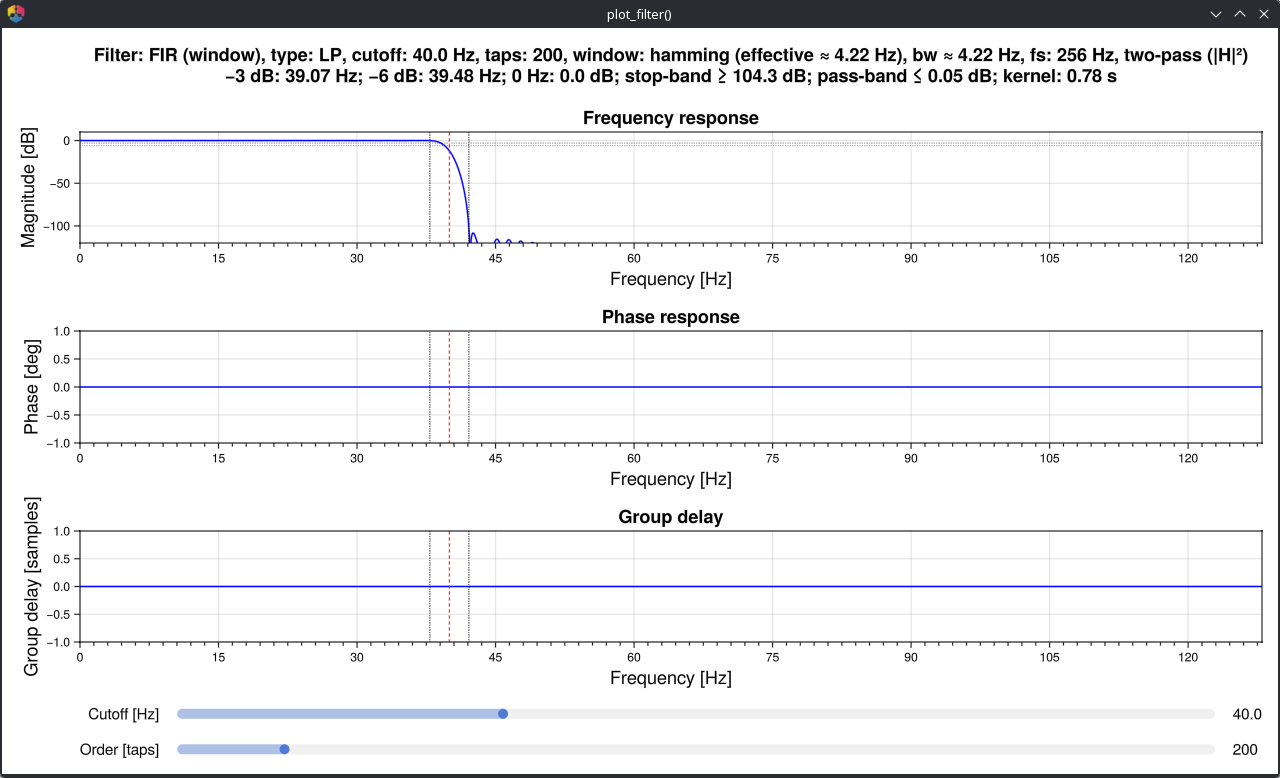
Filter response can be plotted and edited using the preview parameter:
NeuroAnalyzer.filter(eeg,
                     ch = "eeg",
                     fprototype = :fir,
                     ftype = :lp,
                     cutoff = 25,
                     order = 15,
                     bw = 0.5,
                     preview = true)
Tip: When preview=true, signal will not be filtered.
Another way to preview the filter:
flt = plot_filter(fs = sr(eeg),
                  fprototype = :butterworth,
                  ftype = :bs,
                  cutoff = (45, 55),
                  order = 8,
                  gui=false)
and later apply the designed filter:
filter_apply(eeg, ch = "all", flt = flt)You may also use the interactive filter designer to design the filter:
NeuroAnalyzer.plot_filter(eeg,
                          ch = "eeg",
                          fprototype = :fir,
                          ftype = :lp,
                          cutoff = 25,
                          order = 15,
                          bw = 0.5)